New Relic
Health Map
New Relic's first cross-product integration, bringing APM and Infrastructure data into a single view for the first time.
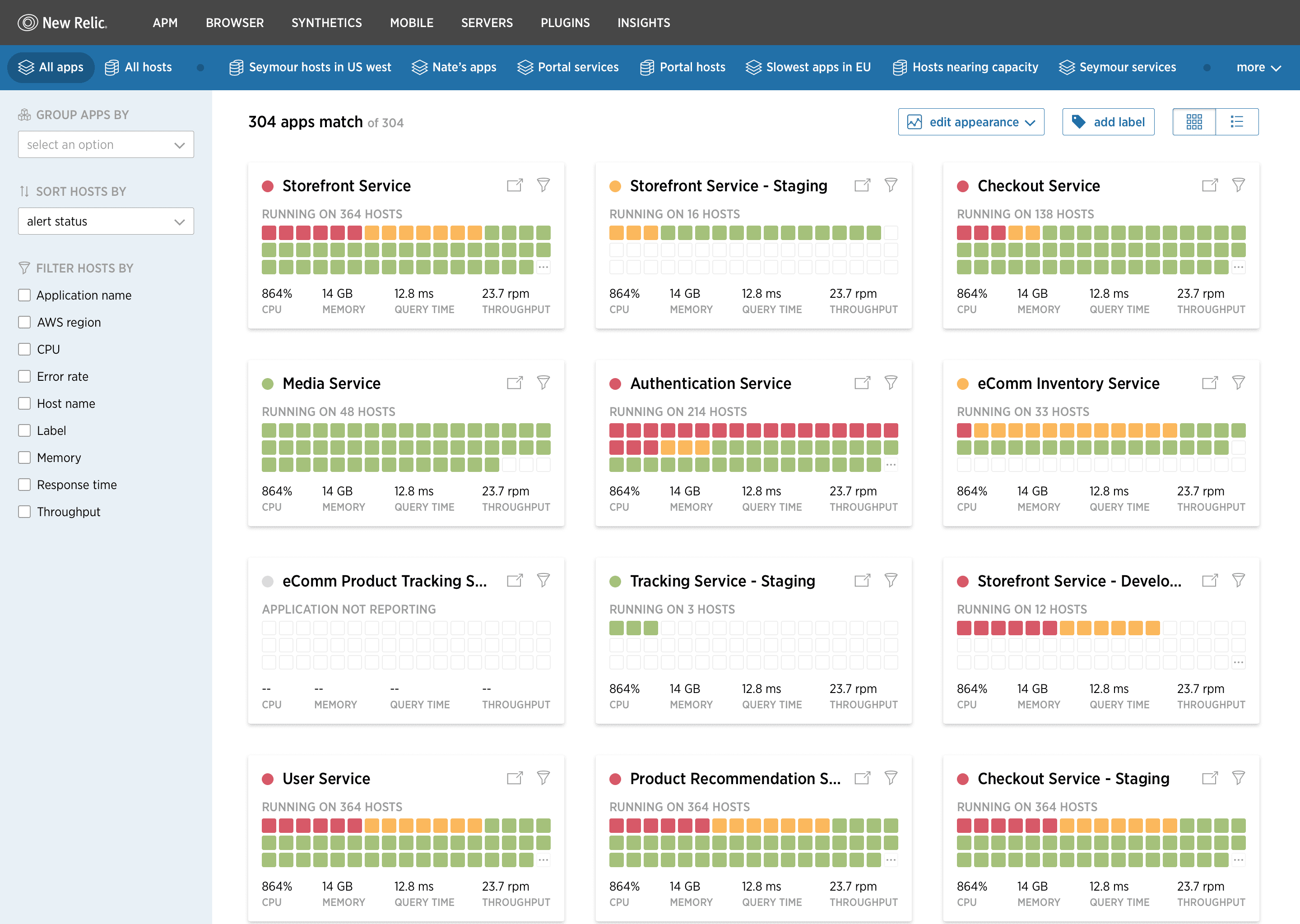
The Health Map: APM and Infrastructure data unified in a single view, organized by application or host.
Context
New Relic built its business on two flagship products: APM (Application Performance Monitoring) and Infrastructure. APM told you how your code was performing: response times, error rates, transaction traces. Infrastructure told you how your servers were doing: CPU, memory, disk I/O. Both were best-in-class, and for years they lived in completely separate corners of the product with no connection between them. For most enterprise engineering teams, both products were open in separate tabs at all times.
The Problem
When something goes wrong in production, the first question is usually whether you're dealing with a code problem or an infrastructure problem. A spike in response times could mean a bad deployment, or it could mean the host running that service is running out of memory, or both. With New Relic's products siloed, answering that question meant manually correlating data across two separate interfaces. Engineers would open APM, spot a degraded service, then switch to Infrastructure, find the hosts running that service, and try to mentally stitch the picture together. Under incident pressure, with dozens of services and hundreds of hosts, this process was slow and error-prone. The data needed to answer the question existed. The product architecture just made connecting it the engineer's problem rather than the platform's.
The Approach
The core design challenge wasn't simply “show both things together.” It was figuring out which way to organize the information. Sometimes an engineer starts with an application: the checkout service is slow, which hosts is it running on, and are any of them struggling? Other times they start with infrastructure: this host is pegged at 100% CPU, what applications are running on it, and are any of them affected? Designing for only one of those entry points would have made the product feel wrong to half the users half the time, so we built a pivotable view: the same health grid, switchable between an app-first and a host-first organization.
The other key decision was how to represent health at a glance. New Relic's existing APM used a color-coded status system (green, yellow, red) that users already understood well. We extended that same visual language into Health Map so the meaning was immediately legible to anyone already using New Relic, rather than introducing a new system to learn.
The Solution
The App-First View
The default view organizes by application. Each card shows an application's health status (error rate, throughput, response time) alongside a compact grid of the hosts it's running on, each color-coded by health. At a glance, you can see if an app is degraded and whether any of its hosts look unhealthy, without leaving the screen.
The Host-First View
Flipping to the host-first view reorganizes the same grid: hosts become the top-level entities, with their running application instances nested beneath. An infrastructure engineer managing server capacity sees their entire fleet at once, with the applications most at risk surfaced alongside each host's resource metrics.
Filters and Scope
With hundreds of applications and hosts, the grid needed strong filtering. Users could filter by application label, AWS region, host name, CPU, memory, error rate, and more, letting them narrow a 300-app view down to the handful of services they cared about. Saved filter sets meant teams could configure views for their specific services and return to them instantly.
The Outcome
Health Map was New Relic's first foray into breaking down the silos between its products, a 0-to-1 bet with no existing internal template for how APM data and Infrastructure data should coexist in a single interface. Beyond its own success, it established the design patterns and architectural thinking that subsequent cross-product features were built on, including the Entity Explorer, which became central to New Relic's platform unification strategy. For engineering teams running complex distributed systems, it reduced the time to answer “is this a code issue or an infrastructure issue?” from minutes of cross-referencing to seconds of scanning.